


-
201507.23
Harry's razors review
This is a review of Harry’s razors. I haven’t been payed by them at all or been sent any promotional materials. The words/opinions expressed here are my own.
I hate shaving, but even more I hate having facial hair. I find it uncomfortable. I’ve used a good amount of shaving products throughout my life, and have settled on the standard cartridge razor, which gives (in my opinion) the best shave-time to shave-closeness ratio and offers a near-perfectly smooth face and neck while only taking about 5-8 minutes to complete.
Now, I’m a bit different from other shavers (I think) in that, like my clothing, I keep my razors around far longer than most people. I will use the same razor head for up to four months (basically until it’s so dull it just won’t work anymore). I usually shave about 3-4 times a week.
“Razor companies HATE him!!”
Up until about 6 months ago, I’d been using mainly Gillette razors. I’d get a big pack of refills at Costco every now and then and work through them over a year or so.
One thing that pissed me off endlessly about Gillette is that by the time I had gone through my set of razor heads, the handle would be obsolete and I’d have to buy a whole new kit (which they charge a lot extra for). So about the third time this happened I decided there had to be a better way than continuously throwing money at Gillette. By the way, their higher-end razors are great, but their practices of having different handles every week is infuriating.
I had previously seen ads for Harry’s razors so decided to give them a shot. The company seems small enough that redesigning their handles/connectors every few weeks would bankrupt them, but initial reviews on the razors themselves were good. I picked up the Truman handle with a set of blades.
Enough babbling, here’s a pros/cons list:
The good
- The handle is solid, and has a nice weight to it (as opposed to plasticy and bendy).
- The razor heads snap in nicely, without any play.
-
The razors have an open back.
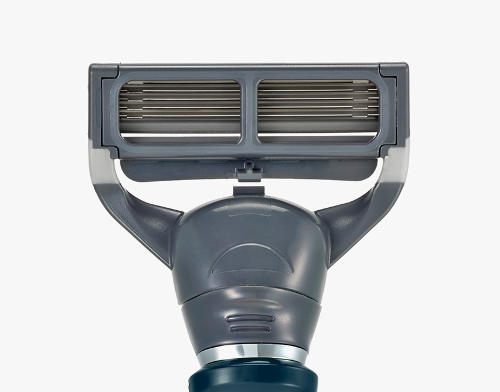 I can’t say enough how great this is. All razors I have ever used hide the back
of the razor with a bunch of plastic.
I can’t say enough how great this is. All razors I have ever used hide the back
of the razor with a bunch of plastic.With a covered back, most of the hair you shave off over the course of the blade’s life ends up staying inside the razor head. You can beat it against the sink or blast it with water all you want, there’s always going to be a bunch of old, moldy hair stuck inside your razor.
With Harry’s, the back is open and a quick rinse under the faucet or showerhead gets rid of all hair on the blade. I cannot stress how easily it is both to unclog and to clean the blades.
- The blades are easy to unclog. Because of the open back, you can easy rinse the blades to get rid of any hair. This makes them ideal for shaving areas with lots of hair, and while Harry’s is marketed towards men I see no reason why these razors wouldn’t be able to work for women as well (and for a lot cheaper than women’s razor heads).
-
The blades last a long time. My maximum is about four months on one blade. This is made easier by how well the blades clean up after use (once again, thanks to the open back). This means for me that a 4-pack of blades should last about a year (sorry, Harry).
They do get noticeably duller after about 4-5 uses, but they continue funcitoning admirably for many, many uses. Once again, I shave maybe 3-4 times a week. So conservatively (3 shaves/week over 12 weeks), that’s about 35-40 shaves per razor head.
The bad
- The handle is slippery. I routinely drop the handle while shaving. Having ugly rubber grips would detract from the look, but make shaving a lot easier.
- The razor heads are somewhat bulky. I find it incredibly hard to reach places of my neck/face that the Gillette razors would glide over no problem. I think if they found a way to remove the thickness of the plastic housing the blades themselves, and possibly make the blades stick out of the housing by a few more micrometers, this would make shaving a lot easier.
- The razors have a strange pulling feeling when shaving, somewhat like pulling a rubber eraser across your face. This is not painful or irritating, just somewhat odd feeling.
- The piece of plastic that gives the blade “spring” when pushed against your face wears down over time, making it feel spongy (and eventually requiring you to hold the razor flat against your face with a finger/thumb on the hand holding the handle). Not a huge deal, and probably not an issue for most people since razor re-use isn’t a 3-4 month affair.
Overall
The pros outweigh the cons easily.
Definitely would recommend this brand. So far, they haven’t changed the handle or blade connectors at all. The blades work admirably. They are a bit bulky, but easy to clean and unclog. The whole setup also looks really nice.
As mentioned, while Harry’s is marketed towards men, this setup could easily work great for women (or anyone) who wants to shave arms/legs as well because of the easy unclogging.
-
200912.05
Tomato - router firmware
I recently got a WRT54G v3 (an older version of a Linksys router) off of ebay. I specifically got a version 3 because it's the best router known to man that's under $300. If you can get one for less than $50, my advice is to take it. Up until a few days ago, it was running the stock Linksys firmware. It's not terrible but it's not very extravagant either. We had a power outage and after that, wireless stopped working. I tried many things, including slapping the unit with my balls to make sure this wasn't some sort of misguided power struggle. Putting it back in its place should fix that. No luck.
I had heard many, many times about the dd-wrt firmware. One of the good things about the WRT53Gv3 is that you can install just about any custom firmware you want onto it. I'd also heard in the past about a firmware called Tomato. It's supposedly light, lean, fast, and has great QoS (although I never even bother with QoS).
I decided to give it a shot. I'm in love. It gives you all the options you need for the things you'd want, but doesn't bloat up the interface with extra junk. It's simply amazing. I really think Linksys should just stop bothering to make their own shitty firmware and just install Tomato on their routers.
Unfortunately, Tomato didn't fix the wireless problem, so I had to plug in an old nemesis Netgear router I had laying around. It starting, in memory of times past, dropping my connection every 5 minutes. Fine for browsing the interweb, but not for streaming music or "videos." I decided to give the Linksys one more shot...and it worked! Thank god. The best router ever with the best firmware I've seen so far, NOW with wireless. It must have been some strange hardware issue that fixed itself.
To be fair, I've never used dd-wrt and therefor can't give a good comparison between it and Tomato. If I had a few extra routers laying around, I'd try it out...but each firmware flash is a dance with the devil and I can't afford to get / find another one.
Kill the radio (or die trying)
Hi, I'm Andrew Lyon.
I'm working on Stamp, a p2p identity system used as the
foundations of other systems, like the upcoming version of Turtl
(a p2p encrypted, collaborative knowledge base) and Basis (the world's
favorite post-capitalist economic protocol).
Recent posts
- Stamp protocol: a p2p identity system
- The property "ownership" myth (and other thoughts on socialization)
- The Five Components of Economic Systems: A discovery through explorations of Socialism
- The mystification of pricing
- Wealth is (mostly) a zero-sum game
- How to really save Net Neutrality
- Debug comments (or how to save your sanity using git)
- Ansible: included handlers not running in v2.x
- Spam entry: We are expert
