


-
202312.12
Stamp protocol: a p2p identity system
If you follow my work much, you’ll know I’m working on Basis, a project with the end goal of supporting a post-capitalist economy. I recently decided to move from the theory of the project into a more concrete implementation. But how? A few years back, I would have reached for blockchain tech but I’ve recently become increasingly suspicious of blockchains as a means for building distributed systems. Their reliance on global consensus means I have to “agree” that a transaction between a fisherman and a street vendor in a coastal town somewhere in Italy is valid…in truth, I don’t give a shit. Let them figure it out. It doesn’t scale and it never will. Blockchains are the ultimate rule-by-committee system where every decision has to be ratified by every participant. Kind of useless for anything beyond banks clearing transfers or dicks scamming idiots with NFTs.
So the next choice is some kind of p2p system. If constructed properly, these systems can scale almost infinitely. However, control mechanisms need to be in place. If some actions in a p2p network protocol are not allowed, who makes sure they aren’t happening? Projects like Holochain try to solve this, and have made decent headway in doing so. In fact, I’ve long followed the Holochain project and been interested in using it for Basis or even Turtl.
One thing that just bugs me about Holochain – and every other p2p system I’ve run into – is that your identity in the system is tied to a single cryptographic key. This key is you: and if the key is lost, “you” no longer exist in the system. This doesn’t end here, though. The “you” key is generated once on one of your devices and forever after lives just on that device with no built-in way to sync it to your other devices. This means there’s a different “you” on your phone, laptop, etc.
Identity in p2p systems has always been an afterthought.
Stamp was born
I originally thought of Stamp as a way to cryptographically provide personal identity within a network. It’s much like PGP in that it works by using cryptographic keys as mechanisms for managing the identity. You can make claims, and others in the system can “stamp” (verify) your claims by signing them. This creates what’s known as a “web of trust.” If I trust Joe, and Joe stamps Jill’s identity, I can now extend a bit of trust to Jill.

Stamp differs from existing key-based identity systems in a few ways, however. It allows creating claims that can be automatically verified, such as the ownership of a domain or URL. It allows claims to be named, opening the door for discovery in other distributed systems (ie, maybe I have an “activitypub” URL claim that points to my Mastodon account).
Another difference is identities in Stamp are not singular objects, but rather collections of “transactions” that are issued by the owner. These transactions link back to previous transactions, creating what’s known as a directed acyclic graph (DAG). This structure allows for auditability, versioning, and easy verification.
Identity management
Of all the differences between Stamp and other identity systems, the most important is that a Stamp identity is not controlled by a single key. Instead, identities have a set of “admin” keys that are assigned abilities using what are known as “policies.” Effectively, a policy is a set of permissions granted to a key or set of keys, allowing those keys to perform certain actions if they are used in the correct combinations.
But why the complexity? Because it opens the door for another paradigm: group management of identities. Now instead of having to build a permissioning system around a singular key that allows someone in a group to create a signature on behalf of an identity, Stamp incorporates the permissioning system directly in the protocol. Policies can grant keys outside of the identity the ability to perform actions within the identity, so before Jill can sign a purchase order on behalf of the company, she needs to get approval from Ted in accounting.
It doesn’t stop at group management, though! One of the most significant problems with existing identity systems is that because they are managed by a single key, if that key is lost then the identity is useless. Stamp solves this: the policy system allows you to specify a recovery mechanism for your identity. You can set up a policy that says “my spouse, brother, and any one of three friends can sign a key replacement transaction” and if you get the correct signatures, you regain access to your identity again. Not bad.
Syncing and storage
Instead of forcing an identity to live on one device and making someone run a bunch of ugly CLI commands in a terminal to move their key to another device, Stamp has built-in private identity syncing for your devices. Although not part of the core identity protocol, the project itself has a layer for keeping your identity synced between your devices.
Included in this syncing, which is accomplished by setting up a p2p network, is public storage of published identities. So ditch those broken GPG key servers…from now on, you only have to look in one place for published identities, and if you’ve got an internet connection, you can look up an identity.
Identity in p2p systems
Ok so I’ve been blathering on and on about this great new identity system. What’s it good for, actually? Remember how I mentioned a Stamp identity is a collection of transactions? Well, turns out, it can issue transactions for things other than just ones that modify the identity.
In fact, Stamp can issue any kind of custom transaction in the same envelope that lets any system that can speak “Stamp” verify that the transaction is valid (when I say “valid” I mean that the transaction is signed by the key(s) required to issue it via the policy system). This means that a Stamp identity can act as a multisig system for issuing transactions in other p2p systems. In effect, p2p systems no longer have to build a concept of identity because Stamp is handling it all for them.
The ability to perform multisig external operations is instrumental for Basis because much of the protocol relies on the ability for groups of people to act as singular economic entities.
What’s next?
The Stamp core protocol is mostly complete at this point. I’m currently working on the network layer of the system: private syncing and publishing. Private syncing is being built in mind with other systems in mind: the next version of Turtl is going to be a p2p system and I’m trying to generalize things in Stamp’s networking layer enough to support Turtl’s need for person-to-person sharing.
Basis has somewhat different requirements though: in effect, groups in Basis have cost allowances that they need to keep their costs under. If they make an order that increases their costs past their allowance, the transaction creating that order is invalid. How do we enforce this effectively? This is a topic of thought for me, and likely involves some sort of federated verification network within the larger p2p system. This is one of those places people reach for a blockchain, and rightly so, however I’d like Basis to be able to run more than 10 transactions a minute so an alternative is needed.
-
It was getting dark, and starting to rain. You needed a place to stay. Not just for the night, but a place to call your own after living under other people’s roofs for so long. You’re tired of moving, tired of the journey. You want to put down roots.
By strange coincidence, a stranger approaches you and says “See that house over there? I’ll sell you the house and the property it’s on for $50K.” You have the money, you’ve saved up for a long time. You agree.
“There’s just one or two more things,” says the stranger. “You can’t make significant modifications to the property without asking me first.” It seems reasonable, so you agree. “Any large-scale projects you wish to do on the property must be cleared by me,” stated the stranger. “And lastly, at any point, if I ever need the property for something, I can take it back from you, and if I do this I will pay market value…but you cannot refuse.” It struck you as odd, but you agree and buy the property.
Do you own it?
Property ownership in the United States…
…is a myth. Nobody owns (land/”real”) property. What people own is a title of use of property, but the property itself is jointly owned between cities, counties, states, and the nation. I’ve had this argument several times with many people, and none of them can reconcile “ownership” with the fact that:
- You often need to get government approval to modify an existing structure on property
- You need government approval for large-scale projects on property (building any kind of large structure, digging a mine, etc)
- Most importantly, the government can take your property away from you via Eminent Domain whenever it deems it necessary (you being compensated is irrelevant to the fact that you have no choice)
You do not own the property you “own” but rather own a title of use, and that title comes with various restrictions. If you can prove me wrong, please feel free to comment below, but to my understanding, if someone gives you something but has the ability to take it away from you at any point, you do not own it.
It gets interesting with things like a civil suit in which being on the losing end means some amount of your assets being seized. Did you own those assets to begin with? It’s an interesting question, but ultimately I would say you did own those assets, but through some form of wrongdoing via your own action/inaction lost access to them, via some socially-mandated set of rules that come along with social or economic interaction with other people.
That said, the fact that you can lose your property without wrongdoing and just because the government wants it, to me, points to the fact that the property was not yours to begin with.
Why does this matter?
This matters because given that property is not owned individually, it follows that property is socialized. In the context of a market system, it means that when you buy/sell property, you’re really just selling the title for use of the property, not the property itself.
So when talking about socialization of productive property or housing, nothing regarding ownership changes materially: the ownership of property is already socialized! What changes is the mediation of the use of property. What this mediation looks like without markets and how it works is another very interesting but complex set of ideas (which are outside the scope of this post).
However, the next time someone says that socialization of property is totalitarian or “doesn’t work” or some such nonsense, tell them that all property is already socialized and ownership is a myth.
-
As an opening note, I’d like to mention that while I came to the conclusions discussed in this post while researching what a “socialist mode of production” would look like, I’m attempting to the best of my abilities to not argue for one system or another. Rather, my goal is to share my findings on how economics can be broken down.
It was December 2018. I had recently read through a forum discussion about Universal Basic Income, an idea I supported at the time. One of the comments mentioned how socialists view UBI as a band-aid fix.
“Wait,” I thought. “Isn’t UBI a form of socialism?” I realized that even though my past 18 year old self had donned the label anarcho-communist, I didn’t actually know what that meant, other than “things should, like, be more equal.” I had left anarcho-communism behind in my 20s when I came to the realization that capitalism does work and became a supporter of it. But for some reason, when this last December rolled by, I connected with my old self again. You see, I have a problem. An addiction. I need to know how things work. It’s why I know a several forms of assembly language. It’s why I have a drawer full of deconstructed electronic components. I can remember my dad tell me as a kid: “Don’t take this apart!”. And now I needed to know what socialism meant; to deconstruct it and understand it. In our culture, the things we most attribute to socialism (state capitalism and welfare capitalism) have nothing to do with socialism. So what is it?
Then it started. A strange manic episode which seemed to come from nowhere. For weeks, I was waking up after only four or five hours of sleep. I would open my eyes, the sky would still be dark, and I was exhausted, but my head was racing. I used my early mornings to my advantage: reading papers, researching economic theory, architecting systems, thinking through methods and incentives. I swam through ideas like I had woken up at the bottom of a lake and needed air: libertarian socialism, central planning, free association, market socialism, common ownership, democratic socialism, communism, syndicalism, social dividends, collectivist anarchism. Marx, Kropotkin, Cockshott. USSR, China, Cuba, South America, the Spanish Civil War. A raging torrent of information, history, and theory. I found a subreddit where people argue bitterly about economics. I talked with people and I fought with people, socialists and capitalists alike. I formed opinions. I talked more. I fought more. I asked questions. I reshaped all my opinions. Then I did it all again.
The whole time, I was working on a project that would be the ultimate conclusion of my findings (which I will publish at a later date). This work has ushered me into a deeper understanding of how things are organized and how the pieces of economics all fit together.
The five components of economic systems
I ultimately found that there are five main components that describe an economic system. Because these are not apparently obvious, I thought it would be helpful to document my observations:
- Ownership. This is the crux of the capitalism vs socialism debate. Capitalism necessitates private ownership of the means of production. Socialism is the social ownership thereof. This means capitalism simpler: anything can be privately owned. Socialism is a bit more complicated, because it makes a distinction between private property (factories and stuff) and personal property (your hat, your Roomba, your toothbrush). This distinction is lost on many people (aka the “you want to take my toothbrush” problem).
- Organization. Is the economy completely decentralized and self-organizing? Or is there one entity that plans every input and output down to meticulous detail? It’s important to note that the former is attributed to capitalism, and the latter to socialism. This is mainly because most Marxist-Leninist states employed central planning for their economic system. But central planning is not socialism…social ownership of productive property is. It’s possible to have privately-owned production with heavy central planning (for instance, Nazi Germany). It’s possible, in theory, to have socially-owned productive instruments with a small (or no) government. We also have central planning in the United States (NASA, farm subsidies, etc).
- Costs/valuation. Valuation can be done with prices guided by market forces, which is the mode we’re all used to because it’s how capitalism does things. However, there are more methods of valuation. There’s the Marxian value theory in which a thing is valued at the average amount of labor it took to build it. There is in-kind valuation, where all possible aspects of costs are tracked for a particular item (for instance, the labor that went into it, how much of each raw material, externalities if possible, etc). It’s important to note that cost and value are different: there is some intersection between the two, but value might ignore a cost like pollution, and cost might not take into account how something is valued to a particular individual.
- Exchange. What medium do productive entities use to exchange? Money is the most prevalent one. There are other ideas, though, such as the free association of producers, where exchange happens freely…producers order things from other producers in order to meet some social need. If using central planning, exchange would look like an internal transfer might look at a large corporation.
- Distribution. Who gets what? If using a money system, those with money buy what they want. If using gift economics, distribution might be a function of reputation. If labor vouchers, distribution is a function of hours worked (and possibly the social value of that labor). In some systems, distribution is need-based (“to each according to their needs”…I realize this is loosely defined). Distribution could be ration based as well: each person gets a daily allowance of resources they can consume. It’s important to note that the distribution mechanism is also what puts downward pressure on resource consumption and incentivizes higher levels of efficiency in the productive process: producers must make things in such a way that those who want those things can afford them.
In theory, some of these parts can be swapped out for another. Also, few of these categories are binary: you can have some mix of public/private ownership, or some mix of decentralized/central planning. However, note that money can be used in a number of these economic components. This is a beautiful selling point of moneyed capitalism, but also what makes it hard to pick the above concepts apart: it’s simple. Anyone can own anything, and valuation/exchange/distribution are all based on money.
Also, notice we’re missing the authoritarian aspect here completely. This is on purpose. Economics and authoritarianism are completely separate topics, as much as people like to lump them in together. It’s possible to have a totalitarian government with privately-owned production. It’s possible to have a tiny government with social ownership of production.
Let’s clarify some ideas.
Ownership
I’d like to talk about the concept of ownership. I think it’s important to mention because it’s a deep topic of debate between proponents of socialism. What does it mean to have “common ownership over the means of production?” What even are the “means of production?”
For the productive instruments to be socially owned, there are a number of different ideas. First, the most common understanding is state ownership. This is tricky, though. If the state is representative of the people in it, then by the state owning the means of production, the people do as well. However, if a state is authoritarian such that the citizens have very little control, then the productive instruments are not held in common, but rather owned by oligarchs. This is in contrast with more anarchist ideas, in which ownership of means of production is directly social, as in, not proxied through a state (or perhaps, in the libertarian case, owned by a municipality) and use thereof is determined cooperatively.
Then, there’s the “means of production” themselves. There are as many definitions of this as there are socialists, but one common theme I’ve seen over and over would be large capital assets: raw materials/resources, productive land (farms), factories, warehouses, office buildings, air/sea ports, large machinery, and intellectual property. Essentially, anything that’s used exclusively for productive purposes would be a target for social ownership. It would be possible to socialize laptops and toothbrushes and things of that nature, but it likely would not be very effective at all.
Lastly, let’s talk companies themselves. Socialism necessitates abolishing private ownership of companies. What does this mean, though? Does the state own all companies? Do the employees? The answer is it depends. In some models (such as central planning), yes, the state would own, or at least orchestrate, all companies. In other systems, companies would be self-determined and would be state-agnostic. It’s important to note that just because the means of production are socialized doesn’t mean that the companies using those means of production need to be socialized as well.
Organization
Another important topic is how the economy is organized. It’s often thought that decentralized organization cannot work without prices/profits. I’d like to demonstrate that as theoretically false.
If you have a transparent system that allows orders between productive entities (for instance, some kind of blockchain), demand can be measured directly by looking at the order list. Instead of, then, using price signals to determine supply levels, supply can be matched directly to demand.
In other words, money is a method of exchange between productive entities, but it’s not the only method of exchange. Organization is as much about communication of needs as it is about a means of exchange: if needs can be communicated directly, then distributed production can be enabled, no matter what valuation system (or system of exchange) is used.
That wraps things up. I hope reading this was as illuminating to you as it was for me to discover it.
-
201904.02
The mystification of pricing
Pricing is an important economic tool. How much things cost, and how much things should cost, has been a subject of debate between economists for a long time. However, there’s one part of pricing I’d like to dissect. It’s the aspect of mystification.
When I buy a product, it sends a signal. It’s essentially an economic feedback mechanism that says “I value this product as much or more than the price that it is being sold for.” This signal is transmitted back to the producer (sometimes over many hops of the economic network because usually you buy a product from a distributor, not directly from the manufacturer). However, the producer does not know why I bought it.
The price takes into account many different factors: the inputs to production required to make the product, the wages of the people producing it, the marketing budget to convince people to buy it, the costs of compliance with regulations, the need to pay back interest on loans acquired for startup capital, shipping costs, etc etc. There are likely thousands upon thousands of factors that are bundled into the price of a product.
The problem is, we don’t know what they are. When I buy something, I am saying “I like this for some reason” and that’s the only economic signal the producer receives. I can call them and say “Hey, I love your peanut butter because it tastes better than others” and companies will certainly encourage this, but there is no economic feedback mechanism other than the purchase itself.
So, if labor costs $5, the inputs to production cost $3, marketing is $1, and the owner of the company wants a profit of $3, that’s
5 + 3 + 1 + 3 = 12. Now, as a consumer, how do I tell how much the labor cost for this product? Or how much profit was made? It’s impossible. You can only find one by knowing all of the others.Why is this a problem? It’s a problem because people encourage voting with capital. They encourage spending based on beliefs. But, there’s no economic feedback mechanism in place to vote for just one of the factors of the price of a product.
Imagine if you had deconstructed pricing for every product. Instead of $5.99 it had $0.03 in environmental compliance, $0.50 in marketing, $1.00 in wages (with a breakdown of labor-hours averaged per-worker), $0.60 in productive inputs (and each input had a deconstructed price as well), $1.67 in equipment maintenance, $0.98 for reinvestment in the company, and $1.21 in profit for the owners.
Now, pricing is demystified. You can buy a product produced by people who are paid well, or buy products that are made from products made by people who are paid well. You can buy a product that spends more in order to care for the environment. You can buy products that value profit less.
Would this not be a a requirement of voting with your dollar?
This thought experiment came out of discussions I’ve have around an economic model I’m working on. One of the ideas I’m interested in is wages being decided democratically based on a set of attributes: social need, skill/training required, stress level, danger, etc. Essentially, each attribute would be a value between 0 and 1, and the average of all the attribute values multiplied by a maximum wage would be someone’s hourly wage. A productivity attribute could be applied to each person such that their occupational wage goes from being fixed to being a range instead, and this productivity rate would be decided by the worker (if self-employed) or the members of their company. The wage attributes would be decided regionally (per-city/county).
In essence, you give every industry-occupation pair a score and use it to determine the range of wages a person can have. After that, you let the pricing system take over. The purpose here is for society to make a conscious decision on “what this job is worth.” My theory is that the economy would be shaped very differently if people were given a direct choice. Want smarter children? Raise the need for the education industry and for the teacher occupation. Too many tech dorks on scooters? Lower the social need for computer programmers. Making wages a conscious decision of the members of the community allows them to shape their own economy, without having to deal with the wildly inaccurate pricing system and the feedback loops of the market.
Should a pro football player be paid 500x more than a teacher? I’m willing to bet that if you asked every single person in the United States this question, the answer would overwhelmingly be “no.” Why, then, does the market enforce these patterns?
After discussions, this idea of democratically setting wages was met with some resistance. It was argued that the market already does allow democratization of wages. People do vote for salaries already, and they do it via the products and services they buy. However, after some thinking, I realized this isn’t true. People certainly enforce economic patterns via their spending, but the truth is that, even if they did want to alter their spending to shape the economy according to their desires, they simply do not have the information they need to do so.
This is because of the mystification of pricing.
UPDATE - Feb 12, 2020
It’s important to note that I’ve since abandoned the idea of democratically-decided wages. While the idea was made in good faith, I couldn’t solve for things like
- On call/emergency hour rate hikes. Sure, my day rate is $100/hr, but if you need me at 3am on the weekend, it’s $200/hr
- Scale. What does a musician make for performing gigs? What if they are playing shows for 1000+ people?
- Distributed decision making. My skills might be highly valued, and forcing a wage on someone when their time is worth more (both to them and the other party) is needlessly authoritarian. Shouldn’t the level of stress, danger, need, training, etc be decided by me and not the general population, who knows jack shit about my job?
I believe all of the problems that might be solved by democratic wages would actually be better handled by democratic workspaces (worker-owned companies) and free association. Not only that, but an excessive amount of beureaucracy is removed (no need to vote just to set wages). While I still support a profitless economy, it should work within the confines of workers being able to negotiate their own wages.
The other stuff I wrote about pricing in the post still stands, however.
-
201903.27
Wealth is (mostly) a zero-sum game
I’d like to talk about wealth. I’ve heard many times from many different people that “wealth is not a zero-sum game.” I disagree.
Wealth is (mostly) a zero-sum game. I will argue that most “creations” of wealth are not actually creations, but instead diversions, and when someone talks of “creating” wealth, they usually mean diverting wealth.
Firstly, let’s distinguish wealth from money. I will define wealth (for our purposes “material wealth”) as the collection of all of one’s possessions that have monetary value in terms of exchange or use. This can be property, investments, money, stockpiles of food, weapons, etc. This is distinct from money because while money can be printed, wealth cannot. Wealth can gain or lose value without any exchanges happening because the market value of the items counted in wealth might change over time, however the loss of value of wealth for one person is generally a gain of wealth for another. For instance, printing money will raise the wealth of the agency printing it while lowering the value of the currency for those holding it (this is a diversion).
Secondly, let’s distinguish wealth from value. In many of the discussions I’ve had about wealth, “value” inevitably comes up. “Value was created.” Wealth encompasses things than have a value (for our purposes, a market value), however this is distinct from societal value, and people are speaking of societal value when they say “value was created.”
Third, let’s describe a market economy. An economy is a network. The nodes of the network are people, companies, or states, and the connections between nodes are transactions. Wealth moves and flows through our economic network like a series of rivers and streams. This network has inputs (things outside of it that feed into it) and outputs (things that are consumed). Creation of new wealth would be defined as an external input to the economic network that previously did not exist (the addition of a new input). All other changes to transactions in the network are diversions.
Inventions
Let’s start with inventions. Often, this is the first thing brought up when people speak of wealth being created. Let’s say I invent the first clock. It consists of a spring that’s wound to power the system mechanically, a set of gears, and a face with arms. The invention is a smashing success, and within a year I am swimming in wealth. Was wealth created? It would certainly seem so, if you were to only look at the individual node of the economic network representing me. That doesn’t explain where the wealth I’ve gained came from then. When I invented the clock, did the market value of one of my clocks suddenly show up in the bank account of everyone interested in buying the clock? No, it did not. Instead, the people who bought the clock found it more useful than something else they would have otherwise bought. In other words, my creation of the first clock did not create wealth, it merely diverted it. If you were to take a simplistic view, you could say that wealth was diverted from sundials. So while I have found new riches, the builders of sundials are perhaps wringing their hands at the very thought of me.
Now, an important distinction I brought up before: wealth and societal value are different! When I created the first clock, societal value was created. People can now tell time at night and they can tell time without owning a plot of land on which a sundial would have gone. I have created value (as in societal value) with my invention. I have not, however, created wealth. No new economic inputs appeared. I have instead diverted existing wealth from other nodes of the economic network to myself.
This applies to all inventions. Airplanes diverted wealth from trains. Cars diverted wealth from carriages, equestrian tradespeople, and barns. Computers diverted wealth (and continue to do so) from countless industries and professions. None of these things directly created new wealth (however, indirect wealth was created when the market demand for silicon skyrocketed in order to build computers).
Stock market
But the stock market! If I buy IBM at $10 and sell a year later for $15, wealth has been created!
Not really. In the simplistic view, people sold other stocks in order to purchase IBM. The stocks they sold are now worth less than before. Or perhaps someone decided to buy IBM’s stock instead of a second car. The car dealership lost a sale because your IBM stock went up.
Why, then, does the stock market keep trending up over time? Isn’t wealth being created? In some ways, yes. If a country has oil reserves, mining that oil has created wealth. This is not enough to explain the overall market growth, however. In essence, the stock market grows when people put money into it. So it follows that the stock market grows because more and more people are buying stocks. This can be seen as a diversion of wealth from outside the stock market as purchases into the stock market. This is, in essence, a growing concentration of wealth into the market, most probably caused by extractions of profit by those who are more inclined to invest:
Here’s the Dow Jones over a 100-year period, inflation-adjusted. Notice the growth patterns before the 1990s: a peak in 1929 of $5.5K, a slightly higher peak in 1966 of $7.8K, then after 1996 explosive growth. This explosion happened right around the time of Clinton’s neoliberal policies encouraging hostile banking in foreign nations and relaxation of trade regulations. In a capitalist sense, this represented a new frontier. Wealth was not created, but diverted to the United States from developing nations.
Speaking of wealth and stock markets, the 2008 financial crisis is a wonderful example of what happens when people attempt to create new wealth. The government bailouts to banks ended up being a large diversion of wealth from taxpayers to greedy pricks.
Actual wealth creation
So why then is wealth a mostly zero-sum game? Because wealth can be created: mining resources, homesteading a previously uninhabited plot of land, and harnessing natural forms of energy (such as farming or solar and wind power).
The best case for wealth creation would likely be mining. Mining creates new economic inputs that were previously unusable, and some of these economic inputs have very high market value.
Also, new technologies can unlock economic inputs that were previously inaccessible. Invention of the offshore drilling rig allows oil extraction where previously infeasible. A device that allows humans to breath underwater indefinitely might allow homesteading of the ocean floor…what was once useless to humans (in the sense of monetary value) is now commodifiable. Or perhaps a space ship that can mine raw materials from Mars would result in the creation of new wealth.
However, in the case of creation of wealth, the wealth created (as in, the economic inputs added to the network) is miniscule to the other economic operations required. For instance with farming, you have to buy the machines to prepare the soil. You have to buy the seeds. You have to buy the watering infrastructure and the water. You have to hire the workers to help you. You have to pay taxes to fund the legal and military system that ultimately protects your land from hostile takeover. The amount of in-network economic transactions required to produce the new economic inputs (the input being food grown by the sun), are miniscule to the creations of economic inputs.
In reality, the few cases where wealth creation actually occurs are either hyper-competitive such that nobody is getting rich by participating (unless they own massive amounts of land and equipment), or they are exclusive to those who already have immense amounts of wealth.
Yes, wealth can be created (but not by you)
Wealth can be created. The creation takes place as an economic input that is either external (like the sun), locked away (under the Earth), or by new technology that allows the harnessing of either of those in order to produce new economic inputs. These new technologies are generally not immediately available to the general public, meaning creation of new wealth is controlled by those that have a critical mass of it already.
In essence, the amount of economic processes that create wealth are tiny compared to the amount of economic processes that are simply diversions of wealth, and unless you have a good heap of starting capital, you will not be creating wealth anytime soon.
For someone with a net worth of $500M, perhaps wealth can be created. For someone with a net worth of $100K, wealth cannot be directly created…only diverted, by convincing people who have wealth already to do so.
Wealth is (mostly) a zero-sum game.
-
201710.27
How to really save Net Neutrality
Net Neutrality is a hot topic in the United States. On the one hand, you have people claiming that government should stay out of the internet. On the other hand, you have people claiming that the internet is much too important to leave in the hands of a few immense telecoms.
What is Net Neutrality?
Net Neutrality is fairly simple. There are many people who will tell you it’s the “government controlling the internet” or “Obamacare for the internet.” This is useless propraganda.
Net Neutrality is the idea that all traffic is treated the same, regardless of its source or destination. From the college student looking at cat photos to the government contractor submitting plans for a new missle prototype: if it’s going over the internet, the packets carrying the information are treated the same.
That’s it.
Why is this important? Well, Comcast has a service, Stream, that competes with Netflix. There are two ways to make money by sidestepping Net Neutrality: Comcast can tell Netflix “pay us a buttload of money every year or we’ll make sure your little streaming service is unusably slow for our customers.” Netflix now has to pony up or lose a large segment of paying customers. On the flipside, Comcast can throttle Netflix and start marketing their Stream service so their customers will more naturally flock away from Netflix.
That’s one example. There are a number of things telecoms can do if Net Neutrality is not enforced:
- Throttle competing services
- Sell tiered internet plans:
- $50 for Basic (Google, Facebook, Twitter)
- $70 for Premium (Basic + CSS, Fox, and 12 other news websites)
- $120 for Platinum (all websites)
- Block websites outright.
Looks bleak.
The principals of Net Neutrality are clearly pro-consumer. Having equal access to all information on the internet without any kind of gatekeeper forcing you into various acceptable pathways is what our country is about: open exchange of ideas.
So why don’t telecoms enforce Net Neutrality?
The problem(s) with the internet in the US
Most big telecoms abhor Net Neutrality as they see it as a barrier to their profit margins. They don’t want to treat traffic equally, going so far as to say it hinders their free speech.
But won’t the free market solve this problem? The answer is “not really.” The free market, as it exists in its current climate, has solved this problem. We are already looking at the solution: A handful of large players, dividing up service areas on gentleman’s agreements, effectively self-enforcing a one-company-per-area monopoly for any given town. In essense, there is no choice in ISP, other than to move to another town.
Another problem is that given that these companies act as gateways to the world’s online information, they are given cash infusions by various governments in order to expand their networks. These expansions either don’t happen at all or if they do, are miniscule compared to the promises made.
In the cases where people decide their town should build fiber lines that are truly owned by the public, the telecoms will file suit and run propaganda campaigns in the towns in order to fight what is essentially free-market competition (with a municipality entering the market as a competitor).
Summary:
- Telecoms are monopolies in the US. There is no “choice” in most locations.
- Telecoms block any competitive choice through collusion or through passing legislation blocking municipal broadband.
- The people of the US have invested billions in telecom infrastructure, but are told we have no choice when deciding the flow of information through the networks we’ve invested in.
The solution: Municipal fiber
Net Neutrality has been ping-ponging in the FCC for a while now. Things were looking good with Wheeler in charge. Now things look dark with Pai. If there is a decisive win either way, the battle will move to congress. Telecoms are pouring money by the truckload into their anti-Net Neutrality campaigns. At the same time there are a vocal group of people fighting to protect NN.
The battle will rage tirelessly for years to come unless we change our methods.
We need to move the battle out of the federal government and into local municipalities. We need to crush the telecoms with public infrastructure. We need fiber in our towns, and LTE towers in our rural areas, all publically owned and operated. Then we can rent out the infrastructure to whoever wants to compete on it.
This creates a level playing field for true competition, while putting the supporting infrastructure where it belongs: in the hands of the public. We have municipal roads. We have municipal water. We have, in many places, municipal power.
It’s time for municipal fiber.
This will end the stranglehold telecoms have on our information. It allows the free market to solve the issue of Net Neutrality through competition, making it something that no longer needs regulatory protection.
The Net Neutrality activists win. The free market fundamentalists win. The only losers are the entrenched powers that are squeezing your wallet while tightening their grip on the flow of information.
Talk to your city/county/state representatives about municipal fiber.
-
A lot of times when I’m programming, I need to write a few lines of code that test what I’m working on. This can be a top-level function call, a few log entries, etc. Much to my dismay, I tended to end up with this debug code committed to git.
I decided I wasn’t going to take it anymore.
Git’s pre-commit hook to the rescue
Now, whenever I add one of these lines, I mark it with a special comment:
console.log('the value is: ', val); // gee, sure hope i don't commit thisbecomes
// DEBUG: remove this log entry
console.log('the value is: ', val);
Then in my pre-commit hook, I symlink a script that checks for
DEBUGcomments in various languages for that repo:#!/bin/sh DEBUG="" function add_to_debug { filetype=$1 comment=$2 next=$( git diff \ --cached \ --name-only \ -G"${comment}[ ]*DEBUG" \ -- "*.${filetype}" ) DEBUG="${DEBUG}${next}" } add_to_debug 'js' '//' add_to_debug 'rs' '//' add_to_debug 'html' '<!--' add_to_debug 'lisp' ';' add_to_debug 'sh' '#' add_to_debug 'hbs' '{{!--' if [ "${DEBUG}" != "" ]; then echo echo "Please address the DEBUG comments in following files before committing:" echo echo "${DEBUG}" | sed 's/^/ /' exit 1 fiUsing this, trying to commit any code that has DEBUG comments will fail with the output:
Please address the DEBUG comments in following files before committing:

  user.js
This forces going back in and cleaning up your code before committing it. Wicked.
Get it yourself
Grab the pre-commit hook off my Github to END THE SUFFERING and stop committing your debug code.
-
I’ll keep this short. I recently installed Ansible 2.0 to manage the Turtl servers. However, once I ran some of the roles I used in the old version, my handlers were not running.
For instance:
# roles/rethinkdb/tasks/main.yml

- name: copy rethinkdb monitrc file
  template: src=monit.j2 dest=/etc/monit.d/rethinkdb
  notify: restart monit
# roles/rethinkdb/handlers/main.yml - include roles/monit/handlers/main.yml# roles/monit/handlers/main.yml - name: restart monit command: /etc/rc.d/rc.monit restartNote that in Ansible <= 1.8, when the monitrc file gets copied over, it would run the
restart monithandler. In 2.0, no such luck.The fix
I found this github discussion which led to this google groups post which says to put this in ansible.cfg:
[defaults]
...
task_includes_static = yes
handler_includes_static = yes
This makes includes pre-process instead of being loaded dynamically. I don’t really know what that means but I do know it fixed the issue. It breaks looping, but I don’t even use any loops in ansible tasks, so

-
201605.27
Spam entry: We are expert
This is a post in a series of spam responses I’m doing after creating a new domain for my website. After receiving a flood of sales calls and emails, I’m deciding to have some fun.
Finally, someone who knows what they’re doing.
Hi,
Would you be interested in building your website? We are a professional web design company based in India.
We are expert in the following :-
Joomla Websites
Word press Websites
Magento Websites
Shopify Websites
Drupal Website
E-Commerce Solutions
Payment Gateway Integration
Custom Websites
Mobile Apps
Digital MarketingIf you want to know the price/cost and examples of our website design project, please share your requirements and website URL.
Thanks,
Prerana
Business Consultant
Note: We are Offering 20% Discount on Web Development Packages.Come to think of it, I DO need a website…
Prerana,
Thank you for contacting us. I work for a very large government contractor in the United States and we are going to use our domain for a very important project of ours. We were going to put out a bid for website development, but looking over your offer makes me realize that maybe we can just subcontract the project directly through your firm. Now, this is a fairly low-budget project, around $750,000.00 USD so you may not have time to take it on. Also, thank you for your 20% discount, which brings the project total down to $600,000.00 USD. Very kind of you.
A bit about the project: We’re trying to use open web technologies to create a supercomputer cluster out of visitors who come to the site. Essentially, government agencies submit “jobs” and those jobs are broken into tiny pieces. Anyone who visits the website is put to work such that their browser grabs the next available job, does the work, and submits it back to the website in completed form.
What we need from your firm is to build a high-throughput queuing system that handles a) breaking large jobs into small ones b) queuing delivery of the jobs to visitors, handling things like connectivity issues and retrying failed jobs c) programming the algorithms in the actual browser that will handle the work itself.
The algorithms are fairly simple, for instance one of them has to do with processing fourier transforms on incoming SETI waveforms. You will then need to classify the deconstructed wave forms for a distributed self-organizing map (Kohonen network) step-by-step using the queue you build so eventually we can pump a wave form through the system and get an automated classification! Easy stuff, but we just don’t have the development bandwidth for it.
Another one of the client-side algorithms is a stream processing system which takes certain sensor data from readings at our particle accelerator and searches for anomalies and outliers across a wide range of data. The detection mechanisms you use are up to you! We don’t want to micro-manage. However, if you provide inaccurate results, billions of dollars will be lost, so try to be mindful!
There are about seven or eight more client-side distributed job algorithms we’ll need, but we can go into details later.
Lastly, and I know this is stupid, but the website will need some sort of video streaming. Our user’s love videos. We have a feed coming from one of our space stations, however the transmitter on the station is broken and is sending data incorrectly. It’s an old transmitter, so it’s analog, even though the signal is digital. We’re planning on sending a mission out to fix it next year (does your firm do shuttle software?) but until then we need the website to be able to decode this analog signal and de-corrupt it, essentially. We have an internal expert on the video feed and the proprietary digital format it uses, however he’s away on vacation in France for a few months so you’ll need to figure out the format yourself and try to decode it from the analog stream. Kid’s stuff. We can send over his notes if needed, but they are scrawled inside of a Sears catalog (he’s a bit disorganized) and the pages are stuck together for some reason so we need to bring in an expert to digitize the notes. However, a firm of your stature should be able to brush this problem aside without too much effort even without his help.
Thanks for your time, let us know if this is something you’re interested in!!
Sometimes the simplest ideas are the best ones. This project should be a cake walk for Prerana and her team.
-
This is a post in a series of spam responses I’m doing after creating a new domain for my website. After receiving a flood of sales calls and emails, I’m deciding to have some fun.
If I send them money, they will make my website findable. Sounds good.
Attention: Important Notice , DOMAIN SERVICE NOTICE
Domain Name: da-wedding-site.comATT: Andrew Lyon
da-wedding-site.com
Response Requested By
22 - May. - 2016PART I: REVIEW NOTICE
Attn: Andrew Lyon
As a courtesy to domain name holders, we are sending you this notification for your business Domain name search engine registration. This letter is to inform you that it’s time to send in your registration.
Failure to complete your Domain name search engine registration by the expiration date may result in cancellation of this offer making it difficult for your customers to locate you on the web.
Privatization allows the consumer a choice when registering. Search engine registration includes domain name search engine submission. Do not discard, this notice is not an invoice it is a courtesy reminder to register your domain name search engine listing so your customers can locate you on the web.
This Notice for: da-wedding-site.com will expire at 11:59PM EST, 22 - May. - 2016 Act now!Select Package:
http://domainssubmit.org/?domain=da-wedding-site.comPayment by Credit/Debit Card
Select the term using the link above by 22 - May. - 2016
http://da-wedding-site.comMust be from Google, right? Resonded:
OH MY GOD I MISSED THE DEADLINE. HOW CAN I REGISTER AND PAY YOU?? I WANT PEOPLE TO FIND MY WEBSITE!!
HELP!!
Will nobody register my domain with the domain service? How could I have been so negligent?
-
201605.27
Spam entry: Logo Cheese
This is a post in a series of spam responses I’m doing after creating a new domain for my website. After receiving a flood of sales calls and emails, I’m deciding to have some fun.
What a great name! Cheesy logos! A bargain!
You are going to need a LOGO!
Let’s keep it simple - let us design your Logo and build your brand!
Your Logo is your brand identity, most of the businesses don’t think about it and later on waist thousands of dollars.
Avail Discount and get 2 custom logo concepts by industry specialist designers in 48 hours for just $29.96
Activate Your Offer Now and let us take care of the rest!
Awaiting your Order
Jennifer Garner
Design Consultant
Logo Cheese - USA
Ahh yes, this reminds me of the times my father and I spent in the English countryside…
YES A LOGO!!!!! That is what my website is missing!! I knew something was off about my website, but I simple could not put my finger on it. I will certainly Activate My Offer and I would like to order twenty of your finest logos. Please have them sent directly to this email and I will certainly remit payment after I have the logos.
Now, I know that your logo company specifically makes logos of various cheeses, but I am going to request that you do logos of things OTHER than cheese. I know this is a lot to ask of Logo Cheese - USA but hear me out. When I was but a young lad, my father used to take my brothers and myself horseback riding into the Yorkshire hills. We would laugh and sing and eat assortments of cheeses into the early evening. Then we would ride to my grandpapa’s estate and spend the week eating more cheese and chuckling over fresh cups of English breakfast tea. Not the store-bought tea you find at the local grocers, being bought by the common coupon-waving trash. No, we would have the finest handmade teas with the most expensive ingredients delivered personally by the craftsman himself, I think his name was Edward. No, it must have been Bartholomew. I believe Edward was the local butcher, who would give us the finest cuts of beefs shoulder one could possibly eat!! The beef was from the most expensive cows in all the land, and Edward would let us pick out the cow and would butcher it, alive, right in front of us. It was delightful! You see, if you kill a cow and then butcher it, much of the flavor is lost. So we would all take turns butchering the poor beast as Edward cheered us on! A truly magnificent experience! Then Edward would package our meat and we would feast that very night!!! We would eat our beef shoulder roasts at my grandpapa’s 30-person dining table, waited on by his staff of servants, and then we would sit by the fire and talk of of times past as we drank our English Breakfast tea, hand-delivered by Bartholomew himself. Now, Bartholomew was a character! The days he visited were some of the most exciting, because not only did he craft and deliver our tea, but the man was a magician!! You can imagine how wonderful that would be for a young lad, to drink his tea whilst watching a magic show right before him!! It was safe to say the Bartholomew was one of our greatest companions!! I digress, though.
You see, one time, in the hillsides, as we were eating our artisanal cheeses and laughing and singing, just before riding to my grandpapa’s house and spending the week drinking the finest tea and eating the finest beef shoulder money can buy, we noticed a shadowy figure approaching from the Northern hills. Years before, papa had instructed us never to go into the Northern hills. There were stories of awful, sickly creatures there, but also of a village deep in the forest where a group of bandits was exiled by King George himself. As the tales go, the bandits had to choose either mating with each other or with the various beasts roaming the hillsides for generations. You can imagine the result! I personally once tried to mate with my father’s prize sheep, but the wretched thing would not sit still long enough. A man of my stature does not take kindly to anyone, or anything, refusing him. Thus, I relished sending that awful sheep to the butcher one day as my father was away on business. But that’s another story!
As this shadowy figure approached, it became more and more grotesque in appearance. Its shirt (if you can call it that!!) had a stain of some sort right on the chest, and the hem around the trousers looked like it had come undone days ago! I couldn’t help but feel sorry for the disgusting, vile creature. As it came even closer though, I could make out its face. It was Bartholomew!! I had never seen him look so disheveled. It made me want to vomit. But papa says vomiting is for the peasants and the sickly, so I just looked away in disgust instead and tried to think of my mother’s fourty-acre garden, instead of the monstrous image of Bartholomew, lurching through the hillsides with stains on his shirt and tattered trousers.
My father got in between us and Bartholomew, protecting us from the vile image. Bartholomew spoke: “HELLLLLP…..ME…..” His raspy voice grated on my ears. Must he keep speaking in that despicable voice? Drink a cup of tea, man!
“Really, Bartholomew,” said father, bravely. “Get a hold of yourself man. You’re scaring the children You ought to be ashamed, wandering the hillside looking like the common London street trash.”
“HELLLLPP!”
“I certainly shall not! I refuse to help a man who will not help himself, who staggers around in tattered clothing, expecting a hand out from those who work hard for themselves. It goes without saying we will no longer be needing your services at the estate, and I shall personally see to it that nobody else in the town of Yorkshire ever buys tea from Bartholomew Dunscrup ever again!”
With that, father turned on his heel, gathered us onto the horses, and we set off for grandapapa’s house. But something was different this evening. The sky was a deep maroon color and the air stank of flesh. We had only made it halfway to grandpapa’s house when the horses slowed, then stopped. Nothing we could do would make them budge. We kicked and pushed, but they sat, still and silent, as if they had given up, like that wretched man we once knew as Bartholomew.. The thought of him sickened me.
Then it hit me. A hunger I cannot describe. It was not for the countryside’s finest beef shoulder. It was a deep hunger for something else. I could not determine the cause of it until I saw my youngest brother’s neck. My body lurched for him, uncontrollable. Everything turned red. When I came to, hours later (or so it felt), my brothers lay strewn across the hill, missing various body parts. My shirt was covered in what looked like blood, and I had bits of flesh between my teeth. What happened? I did not know. Someone had killed my brothers, and from the looks of it had almost killed me. I looked into the distance and saw a man running! I made chase. Perhaps this fine gentleman could tell me of the events prior! Perhaps he witnessed this occurrence and could help investigate!
As I gained on the gentleman, I noticed he had a familiar gait. It was father! He looked back at me and screamed.
“Father, wait!” I shouted. But his pace only quickened. As I gained on him, I noticed a familiar feeling creeping in. A hunger. It gave me an energy I had not felt in the past, and my legs seemed move on their own, accelerating beyond what I thought was possible. Just as I reached father, my vision turned red again.
I woke up, in the dark, in a pool of father’s blood. Whoever had murdered my brothers had murdered father as well!! I swore vengeance to myself. You see, I did not care much for my brothers, but father was very dear to me.
Then it struck me!! There was one other person in the hills that night. It was Bartholomew! The vile man had obviously done this to father! I rushed back to town and awoke the constable. He was a dear family friend, and as soon as he heard what had happened, what Bartholomew had done, he rounded up the entire police force and their most capable hounds, and we set off for an evening hunt. I have always loved a good fox hunt, you see, but had never had the opportunity to participate in a hunt at night!! The constable and I laughed together as we spoke of previous hunts and how we would surely catch Bartholomew on this eve!
Not a minute after we reached the hillside, the dogs picked up a scent. I knew in my heart it was Bartholomew. We made haste and came to a clearing, lit only by the moon, where we saw the same shadowy figure from before, on its knees, crying into its hands. Aha! I thought to myself. We found the wretch!
We dismounted our horses and as we walked toward the figure, I recognized its unnerving voice.
“HELLLP MEEE”
Oh, I would help it, certainly. I would help it shed its mortal coil and release its vile soul back to the hell it came from. As I neared closer the figure, I felt the same hunger from before. It must have been Bartholomew, causing this odd feeling! It’s proof! My vision went red again.
I awoke, but this time it was day. The entire hunting party, all their hounds, and Bartholomew lay strewn before me, their chewed and ravaged corpses beginning to cook slightly in the growing morning sun. Somehow Bartholomew had killed all the policemen, but from the looks of it the dogs must have torn him to shreds.
I searched the pockets of the creature, more disgusted by him than ever before, and found that not only had he slain my brothers, my father, and the entire Yorkshire police department, but he has stolen cheese from my grandfather!!
I was in quite a rage at finding this, and you see, to this day, after inheriting my father’s wealth and my grandfather’s estate, after living through this horrid event and living to tell the tale, and after finding the cheese in Bartholomew’s pocket, I no longer can eat cheese.
Please consider this when sending the logos I have requested.
Father would be proud that I am carrying on his legacy. I think of him every day. In fact, I am reminded of a time when we…
-
201605.27
Spam entry: Add me to your address book
This is a post in a series of spam responses I’m doing after creating a new domain for my website. After receiving a flood of sales calls and emails, I’m deciding to have some fun.
Richard just happened to stumble across my new domain!! What are the odds?
Please add richard@thewebexperts.info to your address book to ensure future email delivery.
Hi Andrew Lyon,
My name is Richard. I recently came across da-wedding-site.com and was curious to find out if you have any design needs (redesign,landing pages, etc.)?
My team and I have worked with organizations like dfwtacticalgear & lapazyachtcharter.
We are offering an ideal package which has been especially tailor-made for you with no monthly and hidden cost:
Business website starting @ 400
e-Commerce/online store starting @ 695
We also specialize in digital marketing, SEO, and analyzing your sites analytics to keep your audience engaged and on your site longer!
If you are interested in speaking about your website, please feel free to share your contact and best time/day to reach you.
Thanks for your time and I hope to hear back from you!
Richard Direct Line: +1 7733828125 Business Hours: 0900 -1800 EST
Promptly added richard to my address book, then responded:
yes hi i want a website but i dont have much money so what i want is to build a website that makes LOTS of money (that’s where you come in) and then once it makes a bunch of money i can pay you back for making the website. lots of people do this. my uncle did this and he was able to put an addition on his trailer AND pay the company that built it back some of the money so its a win win. thx let me know if you are interested!
I can’t wait to show my uncle the new website! His internet is super fast ever since his neighbor upgraded to cable and didn’t password their router!
-
201605.27
Spam entry: A website, for FREE
This is a post in a series of spam responses I’m doing after creating a new domain for my website. After receiving a flood of sales calls and emails, I’m deciding to have some fun.
I’m pretty sure the word “free” is somewhere in Vik’s email. Right??
Dear Andrew,
I just wanted to know if you would need any assistance with your domain da-wedding-website.com. We can help you in building a new website or a mobile application for your domain.
We can also help you with SEO/ASO of any of your existing websites or mobile applications.
Looking forward to hear from you.
Thank you,
Vik
DB Web Apps
Phone: +1 415-671-6239
Email: info@dbwebapps.comResponse:
A website? For FREE? That’s a great deal! Most of the other people sending me emails want to charge me money. This is terrific! My wife will be so pleased at the great deal i have found. Why don’t you send a few free design ideas and I will look them over and tell you which is the best and then you can start work immediately for free.
I am blown away by your generosity.
In a world inundated with greed and selfishness, the biggest gesture one can make is an act of selflessness. Thank you, Vik, for your revolutionary kindness.
-
This is a post in a series of spam responses I’m doing after creating a new domain for my website. After receiving a flood of sales calls and emails, I’m deciding to have some fun.
Their website is so good, it will melt your computer lol which is they we don’t link to it!!!1
Hi Andrew,
Out of respect for your time, I thought an email might be less disruptive than an unannounced phone call. We noticed you recently registered “da-wedding-site.com” so thought of reaching out you.
We have been designing and developing customer-friendly websites for more than 5 years and have managed to live up to the growing expectations of our respective clientele. We believe that a good design always pays off in the long run and helps you attract the attention of your target audience, which eventually converts into ascending sales.
We are a reputed web design and development company offering business-specific solutions to our clients who are scattered all over the world. Over the past few years, we have helped hundreds of clients in having a distinct web presence. Our services include:
- Responsive websites on WordPress, Joomla! and Drupal
- Responsive eCommerce websites on Magento, Prestashop and Shopify
- Custom Web Applications
- Custom Mobile Applications
- Specialized Quality Assurance Solutions
If you want to have a new website or you want to revamp your existing website to make it more search engine friendly, we are the right company. Reply to this email, and we will get back to you with industry-specific solutions.
Regards,
Ken Morgan
Because Ken was so incredibly respectful of my time I wrote him a very detailed response:
hi ken thank you SO MUCH for respecting my time i was thinking about your enticing offer and your reputed website development company and i have some great ideas on websites ok so here they are idea 1 a website that gives people seizures when they visit whether or not they are epilptic funny rite? 2 a website that makes people CRAP THEY?RE PANTSS!! omg my friends would go crazy it would go VIRAL and i could put ads on it and make a million dollars which reminds me can you build the websites first and then after i get the million dollars THEN i can pay you after? k cool thx so idea 3 a website that when you go to it you hold the computer up to a wall and you cna SEE THROUGH THE WALL ON THE SCREEN like xmen and i want to put the xmen logo on it but if i get sued i can tell them you guys did it not me (ur insured rite??) next idea 4 is a website that you put in your bank acct # and it sends you $5 wouldnt that be great like everyone would use that every day including me free $5 rite?!! lol yeah so idea 5 is a website where you click a button and the computer starts to LEVITATE and you can sit on it and you are basically flying and you can go places ON TOP OF YOUR COMPUTER and when you get there and ur like “omg i need to check my email” boom your computer is RIGHT THERE UNDER YOU y has no 1 thought of this people are dumb i guess lol so i have more ideas but im going to hold off for now since i need you to confirm you can build these ideas for free up front hereto notwithstanding forgoing payments etc and then i pay after the work is done and my websites sell for big bucks and i also dont want your reputed company to steal my amzaing ideas so plz sign the attached nda and we can talk business kkthx
<attached an actual NDA>
Really looking forward to getting some of these exciting ideas off the ground. Sometimes the best way to market is to solve a very difficult technical problem, such as levitation. Surely Ken will deliver. After all, he does work for a very reputed web design and development company offering business-specific solutions.
-
201511.22
SSH public key fix
So once in a while I’ll run into a problem where I can log into a server via SSH as one user via public key, and taking the
authorized_keyskeys and dumping it into another user’s.ssh/folder doesn’t work.There are a few things you can try.
Permissions
Try this:
chmod 0700 .ssh/
chmod 0600 .ssh/authorized_keys
sudo chown -R myuser:mygroup .ssh/
That should fix it 99% of the time.
Locked account
Tonight I had an issue where the permissions were all perfect…checked, double checked, and yes they were fine.
So after poking at it for an hour (instead of smartly checking the logs) I decided to check the logs. I saw this error:
Nov 23 05:26:46 localhost sshd[1146]: User deploy not allowed because account is locked
Nov 23 05:26:46 localhost sshd[1146]: input_userauth_request: invalid user deploy [preauth]
Huh? I looked it up, and apparently an account can become locked if its password is too short or insecure. So I did
sudo passwd deployChanged the password to something longer, and it worked!
Have any more tips on fixing SSH login issues? Let us know in the comments below.
-
201509.05
Nginx returns error on file upload
I love Nginx and have never had a problem with it. Until now.
Turtl, the private Evernote alternative, allows uploading files securely. However, after switching to a new server on Linode, uploads broke for files over 10K. The server was returning a 404.
I finally managed to reproduce the problem in cURL, and to my surprise, the requests were getting stopped by Nginx. All other requests were going through fine, and the error only happened when uploading a file of 10240 bytes or more.
First thing I though was that Nginx v1.8.0 had a bug. Nobody on the internet seemed to have this problem. So I installed v1.9.4. Now the server returned a 500 error instead of a 404. Still no answer to why.
I finally found it: playing with
client_body_buffer_sizeseemed to change the threshold for which files would trigger the error and which wouldn’t, but ultimately the error was still there. Then I read about how Nginx uses temporary files to store body data. I checked that folder (in my case/var/lib/nginx/client_body) and the folder was writeable by thenginxuser, however the parent folder/var/lib/nginxwas owned byroot:rootand was set to0700. I set/var/lib/nginxto be readable/writable by usernginx, and it all started working.Check your permissions
So, check your folder permissions. Nginx wasn’t returning any useful errors (first a 404, which I’m assuming was a bug fixed in a later version) then a 500 error. It’s important to note that after switching to v1.9.4, the Permission Denied error did show up in the error log, but at that point I had already decided the logs were useless (v1.8.0 silently ignored the problem).
Another problem
This is an edit! Shortly after I applied the above fix, I started getting another error. My backend was getting the requests, but the entire request was being buffered by Nginx before being proxied. This is annoying to me because the backend is async and is made to stream large uploads.
After some research, I found the fix (I put this in the backend proxy’s
locationblock:proxy_request_buffering off;This tells Nginx to just stream the request to the backend (exactly what I want).
-
201507.29
Turtl's new syncing architecture
For those of you just joining us, I’m working on an app called Turtl, a secure Evernote alternative. Turtl is an open-source note taking app with client-side encryption which also allows private collaboration. Think like a private Evernote with a self-hosted option (sorry, no OCR yet =]).
Turtl’s version 0.5 (the current version) has syncing, but it was never designed to support offline mode, and requires clients to be online to use Turtl. The newest upcoming release supports fully offline mode (except for a few things like login, password changes, etc). This post will attempt to describe how syncing in the new version of Turtl works.
Let’s jump right in.
Client IDs (or the “cid”)
Each object having a globally unique ID that can be client-generated makes syncing painless. We do this using a few methods, some of which are actually borrowed from MongoDB’s Object ID schema.
Every client that runs the Turtl app creates and saves a client hash if it doesn’t have one. This hash is a SHA256 hash of some (cryptographically secure) random data (current time + random uuid).
This client hash is then baked into every id of every object created from then on. Turtl uses the composer.js framework (somewhat similar to Backbone) which gives every object a unique ID (“cid”) when created. Turtl replaces Composer’s cid generator with its own that creates IDs like so:
12 bytes hex timestamp | 64 bytes client hash | 4 bytes hex counterFor example, the cid
014edc2d6580b57a77385cbd40673483b27964658af1204fcf3b7b859adfcb90f8b8955215970012breaks down as:
 timestamp    client hash                                                      counter
------------|----------------------------------------------------------------|--------
014edc2d6580 b57a77385cbd40673483b27964658af1204fcf3b7b859adfcb90f8b895521597 0012
 |                                    |                                        |
 |- 1438213039488                     |- unique hash                           |- 18
The timestamp is a
new Date().getTime()value (with leading 0s to support longer times eventually). The client hash we already went over, and the counter is a value tracked in-memory that increments each time a cid is generated. The counter has a max value of 65535, meaning that the only way a client can produce a duplicate cid is by creating 65,535,001 objects in one second. We have some devoted users, but even for them creating 65M notes in a second would be difficult.So, the timestamp, client hash, and counter ensure that each cid created is unique not just to the client, but globally within the app as well (unless two clients create the same client hash somehow, but this is implausible).
What this means is that we can create objects endlessly in any client, each with a unique cid, use those cids as primary keys in our database, and never have a collision.
This is important because we can create data in the client, and not need server intervention or creation of IDs. A client can be offline for two weeks and then sync all of its changes the next time it connects without problems and without needing a server to validate its object’s IDs.
Using this scheme for generating client-side IDs has not only made offline mode possible, but has greatly simplified the syncing codebase in general. Also, having a timestamp at the beginning of the cid makes it sortable by order of creation, a nice perk.
Queuing and bulk syncing
Let’s say you add a note in Turtl. First, the note data is encrypted (serialized). The result of that encryption is shoved into the local DB (IndexedDB) and the encrypted note data is also saved into an outgoing sync table (also IndexedDB). The sync system is alerted “hey, there are outgoing changes in the sync table” and if, after a short period, no more outgoing sync events are triggered, the sync system takes all pending outgoing sync records and sends them to a bulk sync API endpoint (in order).
The API processes each one, going down the list of items and updating the changed data. It’s important to note that Turtl doesn’t support deltas! It only passes full objects, and replaces those objects when any one piece has changed.
For each successful outgoing sync item that the API processes, it returns a success entry in the response, with the corresponding local outgoing sync ID (which was passed in). This allows the client to say “this one succeeded, remove it from the outgoing sync table” on a granular basis, retrying entries that failed automatically on the next outgoing sync.
Here’s an example of a sync sent to the API:
[
    {id: 3, type: 'note', action: 'add', data: { <encrypted note data> }}
]
and a response:
{
    success: [
        {id: 3, sync_ids: ['5c219', '5c218']}
    ]
}
We can see that sync item “3” was successfully updated in the API, which allows us to remove that entry from our local outgoing sync table. The API also returns server-side generate sync IDs for the records it creates in its syncing log. We use these IDs passed back to ignore incoming changes from the API when incoming syncs come in later so we don’t double-apply data changes.
Why not use deltas?
Wouldn’t it be better to pass diffs/deltas around than full objects? If two people edit the same note in a shared board at the same time, then the last-write-wins architecture would overwrite data!
Yes, diffs would be wonderful. However, consider this: at some point, an object would be an original, and a set of diffs. It would have to be collapsed back into the main object, and because the main object and the diffs would be client-encrypted, the server has no way of doing this.
What this means is that the clients would not only have to sync notes/boards/etc but also the diffs for all those objects, and collapse the diffs into the main object then save the full object back to the server.
To be clear, this is entirely possible. However, I’d much rather get the whole-object syncing working perfectly before adding additional complexity of diff collapsing as well.
Polling for changes
Whenever data changes in the API, a log entry is created in the API’s “sync” table, describing what was changed and who it affects. This is also the place where, in the future, we might store diffs/deltas for changes.
When the client asks for changes, at does so using a sequential ID, saying “hey, get me everything affecting my profile that happened after <last sync id>”.
The client uses long-polling to check for incoming changes (either to one’s own profile or to shared resources). This means that the API call used holds the connection open until either a) a certain amount of time passes or b) new sync records come in.
The API uses RethinkDB’s changefeeds to detect new data by watching the API’s sync table. This means that changes coming in are very fast (usually within a second of being logged in the API). RethinkDB’s changefeeds are terrific, and eliminate the need to poll your database endlessly. They collapse changes up to one second, meaning it doesn’t return immediately after a new sync record comes in, it waits a second for more records. This is mainly because syncs happen in bulk and it’s easier to wait a bit for a few of them than make five API calls.
For each sync record that comes in, it’s linked against the actual data stored in the corresponding table (so a sync record describing an edited note will pull out that note, in its current form, from the “notes” table). Each sync record is then handed back to the client, in order of occurence, so it can be applied to the local profile.
The result is that changes to a local profile are applied to all connected clients within a few seconds. This also works for shared boards, which are included in the sync record searches when polling for changes.
File handling
Files are synced separately from everything else. This is mainly because they can’t just be shoved into the incoming/outgoing sync records due to their potential size.
Instead, the following happens:
Outgoing syncs (client -> API)
Then a new file is attached to a note and saved, a “file” sync item is created and passed into the ougoing sync queue without the content body. Keep in mind that at this point, the file contents are already safe (in encrypted binary form) in the files table of the local DB. The sync system notices the outgoing file sync record (sans file body) and pulls it aside. Once the normal sync has completed, the sync system adds the file record(s) it found to a file upload queue (after which the outgoing “file” sync record is removed). The upload queue (using Hustle) grabs the encrypted file contents from the local files table uploads it to the API’s attachement endpoint.
Attaching a file to a note creates a “file” sync record in the API, which alerts clients that there’s a file change on that note they should download.
It’s important to note that file uploads happen after all other syncs in that bulk request are handled, which means that the note will always exist before the file even starts uploading.
Encrypted file contents are stored on S3.
Incoming syncs (API -> client)
When the client sees an incoming “file” sync come through, much like with outgoing file syncs, it pulls the record aside and adds it to a file download queue instead of processing it normally. The download queue grabs the file via the note attachment API call and, once downloaded, saves it into the local files database table.
After this is all done, if the note that the file is attached to is in memory (decrypted and in the user’s profile) it is notified of the new file contents and will re-render itself. In the case of an image attachment, a preview is generated and displayed via a Blob URL.
What’s not in offline mode?
All actions work in offline mode, except for a few that require server approval:
- login (requires checking your auth against the API’s auth database)
- joining (creating an account)
- creating a persona (requires a connection to see if the email is already taken)
- changing your password
- deleting your account
What’s next?
It’s worth mentioning that after v0.6 launches (which will include an Android app), there will be a “Sync” interface in the app that shows you what’s waiting to be synced out, as well as file uploads/downloads that are active/pending.
For now, you’ll just have to trust that things are working ok in the background while I find the time to build such an interface =].
-
My dad recently gave me a Squeezebox for a present after he’d upgraded his home audio system. I was grateful but ultimately stumped on how to set it up. I read a bunch online about setting it up with the remote it comes with. Oh wait. Mine doesn’t have a remote.
Let the fun begin.
Connecting to the Squeezebox
This is harder than it sounds. Initially, I tried wiring it into my router and seeing if it could see it. It could not. This was a WRT54G with Tomato firmware. Maybe the setups just weren’t compatible or something ridiculous like that.
So I tried another way I found after poking around a lot: the Squeezebox has a build in wireless SSID that you can connect to in ad-hoc mode (after holding the only button for > 6 seconds and it enters reset/config mode).
However, doing this is finicky and had me tearing my hair out. Ultimately, I got my Windows machine connected to it. When it connects, it gives your machine an IP in the 192.168.1.100-254 range. If it gives you a 169.xxx.xxx.xxx address, it’s game over. Try restarting your machine. Try resetting the Squeezebox. Try a rain dance while wearing a tribal loincloth. You just might get that IP.
I recently bought a new router (Buffalo, w/ DD-WRT) and plugged the reset-mode Squeezebox into it (via LAN) and was able to connect to it instantly, so try that first and only go the ad-hoc wireless route if you absolutely have to.
Talking to the Squeezebox
The Net-UDAP software is amazing and wonderful. I don’t know what it does under the hood, but it lets you talk to your Squeezebox should you finally get connected to it in some capacity.
Unless you’re on Windows. Yes, I know, it supposedly works on Windows but just didn’t find the Squeezebox with running
discover.My only solution was to spin up a linux VM with a bridged network adapter and run Net-UDAP there instead. Worked flawlessly. Hopefully you have a linux box laying around, or maybe it will just work for you in Windows. Try the Windows perl binary instead of cygwin’s perl.
Anyway, once you’ve got everything connected, you run the Net-UDAP like so:
cd /path/to/net-udap
./scripts/udap_shell.pl -a 192.168.0.106
Note that the
192.168.0.106is the address for the machine you’re running the shell on, not the Squeezebox itself.You should get a prompt:
UDAP>Now run the discover command:
UDAP> discover
info: *** Broadcasting adv_discovery message to MAC address 00:00:00:00:00:00 on 255.255.255.255
info:   adv_discovery response received from 69:69:69:69:69:69
info: *** Broadcasting get_ip message to MAC address 69:69:69:69:69:69 on 255.255.255.255
info:   get_ip response received from 69:69:69:69:69:69
info: *** Broadcasting get_data message to MAC address 69:69:69:69:69:69 on 255.255.255.255
info:   get_data response received from 69:69:69:69:69:69
Hopefully you get output like that. If you get empty output, see “Connecting to the Squeezebox” =[.
Setup
Once that finicky little bastard is
discovered, runlist:UDAP> list # MAC Address Type Status == ================= ========== =============== 1 69:69:69:69:69:69 squeezebox initYou can see it has an ID of
1so we do:UDAP> conf 1Your prompt will now change, and you’re in config mode:
UDAP [1] (squeezebox 696969)>Now you can connect it to your network via wireless by setting values into its config. This will differ network to network, but here are the commands I run to get things working on a network with WPA2-PSK TKIP+AES:
set hostname=jammy interface=0 lan_gateway=192.168.0.1 lan_ip_mode=1 primary_dns=192.168.0.1
set wireless_SSID='my network SSID' wireless_wpa_mode=2 wireless_wpa_cipher=3 wireless_keylen=0 wireless_mode=0 wireless_region_id=4 wireless_wpa_on=1 wireless_wpa_psk='WPA passwordddd' wireless_channel=9
set server_address=192.168.0.113
For a list of the fields and what they mean, type
fields:UDAP [1] (squeezebox 696969)> fields bridging: Use device as a wireless bridge (not sure about this) hostname: Device hostname (is this set automatically?) interface: 0 - wireless, 1 - wired (is set to 128 after factory reset) lan_gateway: IP address of default network gateway, (e.g. 192.168.1.1) lan_ip_mode: 0 - Use static IP details, 1 - use DHCP to discover IP details lan_network_address: IP address of device, (e.g. 192.168.1.10) lan_subnet_mask: Subnet mask of local network, (e.g. 255.255.255.0) primary_dns: IP address of primary DNS server secondary_dns: IP address of secondary DNS server server_address: IP address of currently active server (either Squeezenetwork or local server squeezecenter_address: IP address of local Squeezecenter server squeezecenter_name: Name of local Squeezecenter server (???) wireless_SSID: Wireless network name wireless_channel: Wireless channel (used by AdHoc mode???) wireless_keylen: Length of wireless key, (0 - 64-bit, 1 - 128-bit) wireless_mode: 0 - Infrastructure, 1 - Ad Hoc wireless_region_id: 4 - US, 6 - CA, 7 - AU, 13 - FR, 14 - EU, 16 - JP, 21 - TW, 23 - CH wireless_wep_key_0: WEP Key 0 - enter in hex wireless_wep_key_1: WEP Key 1 - enter in hex wireless_wep_key_2: WEP Key 2 - enter in hex wireless_wep_key_3: WEP Key 3 - enter in hex wireless_wep_on: 0 - WEP Off, 1 - WEP On wireless_wpa_cipher: 1 - TKIP, 2 - AES, 3 - TKIP & AES wireless_wpa_mode: 1 - WPA, 2 - WPA2 wireless_wpa_on: 0 - WPA Off, 1 - WPA On wireless_wpa_psk: WPA Public Shared KeyTo see the values already set, run
listwhen in config mode.Great, so you’ve set up all your network values and are confident that you’ve done it all right the first time. Good for you. Now you can run
save_data:UDAP [1] (squeezebox 696969)> save_data info: *** Broadcasting set_data message to MAC address 69:69:69:69:69:69 on 255.255.255.255 ucp_method set_data callback not implemented yet at /path/to/udap/../src/Net-UDAP/lib/Net/UDAP.pm line 292. Raw msg: 00 01 02 03 04 05 06 07 - 08 09 0A 0B 0C 0D 0E 0F 0123456789ABCDEF 00000000 00 02 00 00 00 00 00 00 - 00 01 00 04 20 16 5A 05 ............ .Z. 00000010 00 01 C0 01 00 00 01 00 - 01 00 06 00 1A ............. info: set_data response received from 69:69:69:69:69:69Make sure
save_datareturns a response similar to this. If it doesn’t, run it again. In fact, run it again anyway. Run it again…and again…and again.Great, now run
resetto finalize everything:UDAP [1] (squeezebox 696969)> reset info: *** Broadcasting reset message to MAC address 69:69:69:69:69:69 on 255.255.255.255 ucp_method reset callback not implemented yet at /path/to/udap/../src/Net-UDAP/lib/Net/UDAP.pm line 292. Raw msg: 00 01 02 03 04 05 06 07 - 08 09 0A 0B 0C 0D 0E 0F 0123456789ABCDEF 00000000 00 02 00 00 00 00 00 00 - 00 01 00 04 20 16 5A 05 ............ .Z. 00000010 00 01 C0 01 00 00 01 00 - 01 00 04 ........... info: reset response received from 69:69:69:69:69:69All done. Now don’t ever change your network setup ever again or you’ll have to deal with this shit again. Or just get a fucking remote…
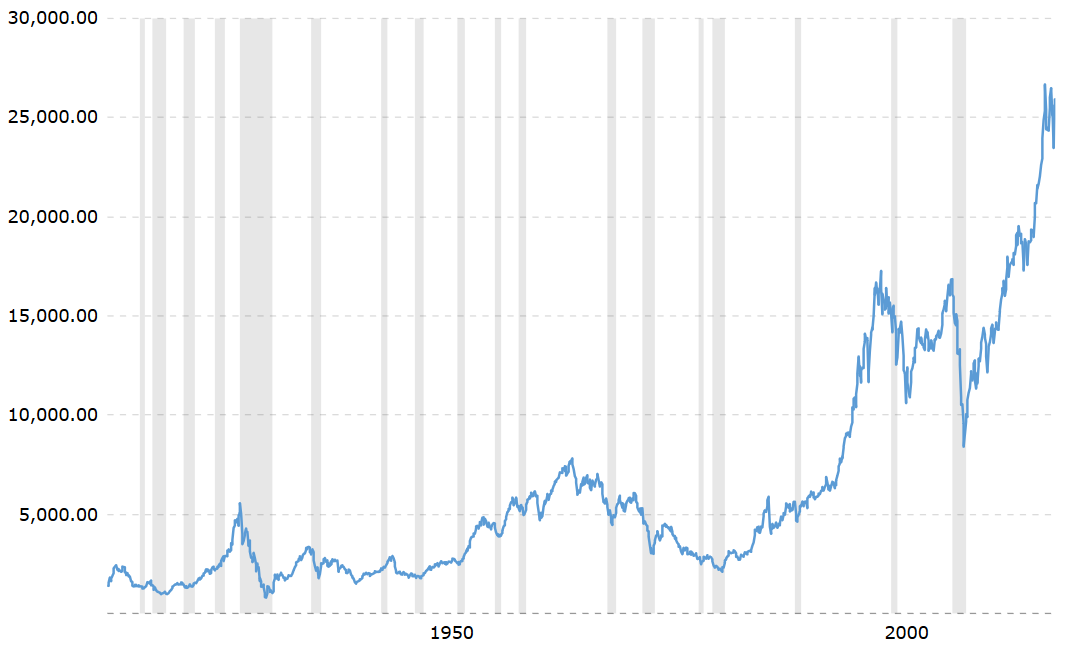
Newer | Older